
Dominating Google: The Best Marketing Platform for Your Small Business (2026)
Table of Contents
- Introduction: From Overwhelmed to Over-Performing
- Part 1: The 2025 Marketing Landscape: Why Your Platform is Your Most Critical Asset
- Part 2: Key Features of a Winning Marketing Platform for Small Businesses
- Part 3: The Ultimate 2025 WordPress Marketing Platform Showdown
- Part 4: The Unseen Engine: How Website Caching Supercharges Your Marketing Platform
- Part 5: Enterprise-Level Speed: Configuring Varnish for WordPress
- Part 6: Measuring What Matters: Tracking Your Marketing ROI
- Part 7: Your Final Decision-Making Checklist
- Conclusion: Build Your Growth Engine
- Frequently Asked Questions (FAQ)
From Overwhelmed to Over-Performing
For many small business owners, the daily reality of marketing feels less like strategic growth and more like spinning plates. You’re buried under a mountain of manual workflows: sending follow-up emails, segmenting audience lists, scheduling social media posts, and desperately trying to personalize content at scale. As one marketer aptly described, it’s a “hamster wheel of repetitive tasks” that leaves you feeling perpetually behind, prone to errors, and distracted from the creative, high-impact work that actually moves the needle useinsider.com, .
You face the constant pressure to grow, but are constrained by limited resources, a small team, and a digital landscape that grows more competitive by the day. The more you grow, the more plates there are to spin, and one wrong move can send them all crashing down. Spreadsheets help you track it all, but they don’t run your marketing for you. This is the universal pain point for small and medium-sized businesses (SMBs) in 2025: the gap between ambition and execution.
This guide is your definitive roadmap to bridge that gap. It’s built on a simple but powerful promise: the right marketing platform is more than just software; it’s a system that transforms your business from overwhelmed to over-performing. For a small business, the right platform works like “hiring an extra set of hands without adding to payroll,” automating the mundane so you can focus on strategy .
But in 2025, choosing a platform is not enough. True digital dominance—the kind that propels you to the top of Google search results—depends on the synergy between three foundational pillars:
- Powerful Marketing Automation: The software that streamlines your workflows, nurtures your leads, and personalizes customer experiences at scale.
- A High-Performance Website: The technical foundation that ensures your marketing efforts aren’t wasted on a slow, frustrating user experience. A fast website is no longer a luxury; it’s a prerequisite for conversion.
- Measurable Return on Investment (ROI): The data-driven framework that connects every marketing action directly to revenue, proving what works and what doesn’t.
This report will guide you through each of these pillars. We will conduct an in-depth, unbiased showdown of the top marketing platforms for WordPress users, dive deep into the technical configurations that give you enterprise-level website speed, and provide a practical framework for measuring your success. By the end, you will not just have chosen a tool; you will have architected a complete, scalable growth engine for your small business.
Part 1: The 2025 Marketing Landscape: Why Your Platform is Your Most Critical Asset
Before diving into feature comparisons and technical configurations, it’s crucial to understand the landscape in which your small business operates. The marketing world of 2025 is defined by two powerful, opposing forces: unprecedented technological opportunity and intense, unforgiving customer expectations. Your marketing platform is the bridge between these two realities, and its effectiveness dictates whether you thrive or merely survive.
The State of Marketing Automation
Marketing automation is no longer an emerging trend; it is the established standard for businesses of all sizes. The market’s explosive growth is a testament to its indispensable role. Projections show the marketing automation market growing from approximately $7.23 billion in 2025 to $16.81 billion by 2032, reflecting a compound annual growth rate (CAGR) of 12.8% . Other analyses place the 2024 market value at $6.65 billion, projecting it to reach $15.58 billion by 2030 with a 15.3% CAGR .
This growth isn’t just happening at the enterprise level. While large enterprises held 62.5% of the market in 2024, small and medium-sized enterprises (SMEs) represent the fastest-growing segment, with a projected CAGR of 15.2% through 2030 . The reason is clear: SaaS pricing models, freemium tiers, and user-friendly interfaces from platforms like HubSpot, ActiveCampaign, and Brevo have democratized access to tools that were once the exclusive domain of large corporations.
The adoption rates reflect this new reality. As of 2025, approximately 75% of all businesses are using some form of marketing automation. This widespread adoption means that if you are still relying on manual processes, you are operating at a significant competitive disadvantage. Your competitors are automating lead nurturing, personalizing communication, and analyzing campaign performance while you’re still exporting CSV files.
The demand for automation is pervasive. A 2024 report revealed that 91% of organizations have seen an increase in internal demand for automation across all departments, not just marketing. While marketing leads the charge (26% demand), departments like R&D (39%) and operations (38%) are also pushing for more efficient workflows . This internal pressure underscores a fundamental business truth: efficiency is survival.
For a small business, this landscape presents both a threat and an opportunity. The threat is being outpaced by more agile, automated competitors. The opportunity is to leverage these powerful, newly accessible tools to level the playing field, streamline operations, and deliver a customer experience that rivals that of much larger companies.
The High Cost of a Slow Website
Here is a brutal truth of digital marketing in 2025: even the most brilliant, perfectly automated marketing campaign will fail if it directs users to a slow website. Page load speed is not a technical afterthought; it is a foundational element of your entire marketing strategy. When your site is slow, you are actively losing sales and burning your marketing budget.
Consumers today are not willing to wait. A delay of just a few seconds can have a catastrophic impact on user behavior. Slow websites suffer from higher bounce rates, lower time on page, and abysmal conversion rates . Every dollar you spend on Google Ads, every hour you invest in content marketing, and every email you send is undermined by a poor technical foundation.
Crucially, this isn’t just about user perception. It’s about visibility. Google has explicitly used site speed as a ranking factor for desktop search since 2010 and for mobile search since 2018 . The logic is simple: Google wants to provide its users with the best possible experience, and a slow website is a bad experience. Therefore, slow websites are penalized with lower search rankings, meaning potential customers will see your competitors’ sites long before they ever see yours.
“Like us, our users place a lot of value in speed; that’s why we’ve decided to take site speed into account in our search rankings.”
– Google Search Central, 2010
This directly connects to the central goal of this guide: “Dominating Google.” You cannot dominate search results for “what is the best marketing platform for your small business” or any other term if your own website is slow. The technical performance of your site is inextricably linked to your SEO success.
Bridging the Gap: Performance as a Marketing Metric
The critical insight for 2025 is to stop viewing website performance as a purely technical issue, siloed within the IT department. For a small business, website performance metrics like **Core Web Vitals (Largest Contentful Paint, Cumulative Layout Shift, First Input Delay)** and overall page load time are marketing KPIs. They are as important as click-through rates and conversion rates because they directly influence them.
Consider the chain of events:
- A well-implemented caching strategy (which we will detail in Parts 4 and 5) dramatically improves your page load speed.
- Faster load times lead to a better user experience, which reduces your bounce rate.
- A better user experience and lower bounce rate signal to Google that your site is high-quality, boosting your SEO rankings.
- Visitors who have a fast, seamless experience are more likely to trust your brand and complete a desired action (e.g., fill out a form, make a purchase), thus increasing your conversion rate.
- A higher conversion rate directly improves the ROI of every single marketing campaign you run.
This is the bridge between the technical and the strategic. Your marketing platform is the engine that drives traffic and engagement, but your website’s performance is the chassis and transmission that translates that power into forward motion. Without a high-performance chassis, the most powerful engine in the world just spins its wheels. This is why a significant portion of this guide is dedicated to the “unseen engine” of caching and server configuration—it’s the secret weapon that supercharges your marketing platform and ensures your investment pays off.
Part 2: Key Features of a Winning Marketing Platform for Small Businesses
Choosing a marketing platform can feel overwhelming. The market is flooded with tools all claiming to do everything. To cut through the noise, it’s essential to focus on the core functionalities that deliver the most value to a small business. This isn’t about finding the platform with the most features; it’s about finding the one with the *right* features for your specific goals, coupled with a clear understanding of its true cost.
Core Functionality Checklist
Based on extensive analysis of expert reviews and user needs, a winning marketing platform for a small business in 2025 must deliver on these key areas. Use this as a checklist when evaluating your options.
- Automated Lead Nurturing & Scoring: This is the heart of marketing automation. The platform must allow you to create automated workflows (or “journeys”) that nurture leads from initial contact to conversion. For example, when a user downloads an ebook, the system should automatically send a series of follow-up emails with related content. As the lead interacts with your content (opens emails, visits the pricing page), the platform should assign points—a process known as lead scoring. This helps your sales team prioritize the hottest, most engaged leads, saving immense amounts of time .
- Integrated CRM (Customer Relationship Management): A marketing platform without a tightly integrated CRM is like having two different brains. A unified system ensures that your marketing and sales teams are working from the same data. When a marketer sees a lead’s engagement history and a salesperson sees their deal status in the same place, the customer journey becomes seamless. This integration is crucial for personalizing communication and accurately tracking ROI from lead to close .
- Personalized & Segmented Campaigns: Moving beyond basic “Hi, [First Name]” personalization is non-negotiable. A strong platform enables dynamic content, where different parts of an email or landing page change based on the viewer’s data (e.g., showing different product recommendations based on past purchases). It must also offer robust segmentation, allowing you to group contacts based on behavior (e.g., “abandoned cart in last 24 hours”), demographics, or engagement level. This is the key to delivering relevant messages that resonate and convert .
- Multi-Channel Orchestration: Your customers don’t live in a single channel, and neither should your marketing. The best platforms act as a central hub to coordinate campaigns across email, SMS, social media, website pop-ups, and live chat. For example, a journey could start with a web push notification, follow up with an email for non-converters, and then send an SMS with a special offer to highly engaged users. This cross-channel approach, as highlighted by platforms like Insider, ensures a consistent brand experience and maximizes reach .
- Analytics and ROI Reporting: If you can’t measure it, you can’t improve it. Your platform must provide clear, intuitive dashboards that connect marketing activities to business outcomes. You need to be able to see which email campaigns drove the most sales, which social media channels generated the most qualified leads, and what the overall ROI of your marketing spend is. This data is what transforms marketing from a cost center into a revenue driver .
- AI-Powered Features: In 2025, Artificial Intelligence is no longer a futuristic buzzword; it’s a practical tool. Look for platforms that use AI to enhance your marketing. This can include AI-powered content creation (writing email subject lines or blog post drafts), predictive analytics (forecasting which leads are likely to churn), smart segmentation (automatically identifying audience groups), and send-time optimization (delivering emails when each individual is most likely to open them). These features act as a force multiplier for small teams MarketerMilk, .
Evaluating Total Cost of Ownership (TCO) vs. Sticker Price
One of the biggest mistakes a small business can make is choosing a platform based solely on its advertised monthly price. The “sticker price” is often just the tip of the iceberg. A true evaluation requires calculating the Total Cost of Ownership (TCO), which is a comprehensive estimate of all costs associated with the software over its entire lifecycle .
A thorough TCO analysis not only prevents budget surprises but also forces you to think critically about implementation, training, and scalability. Here are the key factors to consider:
| Cost Category | Description | Example Costs |
|---|---|---|
| Acquisition Costs | The direct, upfront costs to gain access to the software. |
|
| Implementation Costs | The costs associated with getting the platform running and integrated into your business. |
|
| Operating Costs | The ongoing costs to use and maintain the platform effectively. |
|
| Hidden Costs | Less obvious costs that can significantly impact the overall investment. |
|
By thinking in terms of TCO, you shift your mindset from “What’s the cheapest option?” to “What’s the best long-term investment?” A platform with a slightly higher monthly fee but free onboarding, intuitive ease of use, and scalable pricing might have a lower TCO and deliver a much higher ROI than a “cheaper” alternative that nickels and dimes you for every feature and requires extensive training.
Part 3: The Ultimate 2025 WordPress Marketing Platform Showdown
For the vast majority of small businesses, their website is built on WordPress. Therefore, the “best” marketing platform is not just about standalone features; it’s about how deeply and seamlessly it integrates with the WordPress ecosystem. A clunky integration can create data silos, slow down your site, and negate the benefits of automation. A smooth integration, however, turns your website into a powerful, data-collecting extension of your marketing engine.
In this section, we conduct an in-depth, head-to-head comparison of the three leading contenders for WordPress users in 2025, based on market share, feature sets, and user reviews.
Introduction to the Contenders
After analyzing dozens of platforms, three consistently rise to the top for small businesses using WordPress:
- HubSpot: The undisputed market leader, holding over 38% of the marketing automation market . HubSpot is an all-in-one platform that combines marketing, sales, service, and a CRM into a single, cohesive ecosystem. It’s best known for popularizing the “inbound marketing” methodology.
- ActiveCampaign: A powerhouse in automation and email marketing, ActiveCampaign is beloved by data-driven marketers for its granular control over workflows, advanced segmentation, and powerful CRM capabilities, often at a more accessible price point than HubSpot’s higher tiers.
- Brevo (formerly Sendinblue): The challenger that has rapidly grown by offering an impressive suite of tools—including email, SMS, chat, and a sales CRM—on a remarkably generous free plan and affordable paid tiers. It’s a favorite among startups and budget-conscious small businesses.
In-Depth Comparison Framework
We will evaluate each platform across a consistent set of criteria crucial for small business success. This framework is designed to move beyond marketing claims and provide a clear, actionable comparison.
Platform Comparison at a Glance
| Feature / Aspect | HubSpot | ActiveCampaign | Brevo |
|---|---|---|---|
| Ideal User | Businesses committed to the inbound methodology seeking an all-in-one solution. | Data-driven marketers who need powerful, granular automation and CRM. | Startups and SMBs needing a feature-rich, budget-friendly platform. |
| WordPress Plugin | All-in-one: Forms, live chat, pop-ups, contact sync, analytics dashboard. | Focused: Forms, site tracking, live chat, deep data integration. | Comprehensive: Forms, contact sync, transactional emails, chat, automation. |
| Free Plan Generosity | Very generous CRM (unlimited contacts), but limited marketing features (2,000 emails/mo, HubSpot branding). | 14-day free trial only. No permanent free plan. | Extremely generous: Unlimited contacts, 300 emails/day (9,000/mo), chat, CRM. |
| Core Strength | Unified CRM and inbound marketing ecosystem (SEO, blogging tools). | Advanced, flexible automation builder (“recipes”) and deep segmentation. | Value for money; offering a wide range of features at a low cost. |
| Ease of Use | Very high. Clean, intuitive interface, though can get complex at enterprise level. | Moderate. Powerful features require a steeper learning curve for beginners. | High. User-friendly dashboard and drag-and-drop editors. |
| Starting Price (Paid) | ~$15/user/month (Starter Bundle). Marketing Hub starts ~$45/month. | ~$19/month (1,000 contacts). CRM is a paid add-on. | ~$9/month (Starter). |
| Pricing Model & Scalability | Can get very expensive quickly on higher tiers. Costs scale with contacts and feature hubs. | More predictable scaling. Price increases primarily with contact count. | Pay-per-email model is cost-effective for large lists with infrequent sending. |
| CRM Included? | Yes, a core part of the platform, even on the free plan. | Yes, a full-featured sales CRM is included, but advanced features are add-ons. | Yes, a sales CRM is included on all plans, including free. |
| Automation Power | Good on Starter, very powerful on Professional/Enterprise tiers (but expensive). | Excellent. Industry-leading for its price point. Highly visual and flexible. | Good. Covers most SMB needs, but less granular than ActiveCampaign. |
| Performance Impact | Plugin can be heavy. Users report performance reductions. Requires optimization. | Generally lighter, as it’s more focused on tracking scripts and forms. | Generally considered lightweight. |
| Email Deliverability | Strong. Score: 4.0/5. Provides good tools for authentication and hygiene. | Excellent. Rated #1 for deliverability in some studies. Score: 4.0/5. | Good. Provides solid deliverability support and infrastructure. |
Conceptual Trade-off: Power vs. Price
HubSpot: The All-in-One Inbound Powerhouse

1. WordPress Integration
HubSpot’s official WordPress plugin, “HubSpot – CRM, Email Marketing, Live Chat, Forms & Analytics,” is a masterclass in creating a seamless bridge between a website and a marketing platform . Once installed, it embeds the HubSpot tracking code and gives you a suite of tools directly within your WordPress dashboard:
- Forms & Pop-ups: Easily build forms and pop-ups with HubSpot’s drag-and-drop editor and embed them on your site. All submissions are automatically synced to your HubSpot CRM.
- Live Chat & Chatbots: Add live chat to your site to engage visitors in real-time. You can also build simple chatbots to qualify leads or answer common questions 24/7.
- Contact Management (CRM): Every interaction a user has with your forms or chat is logged in the HubSpot CRM, building a rich profile of their activity on your site.
- Built-in Analytics: The plugin provides a dashboard within WordPress that shows you which pages and traffic sources are generating the most leads, making it easy to see the impact of your content without leaving your site .
The integration is incredibly easy to set up, but this power comes at a cost. The plugin loads multiple JavaScript files, and users have frequently reported that it can slow down a website if not properly optimized . This reinforces the need for the caching strategies discussed later in this guide.
2. Core Features & Strengths
HubSpot’s greatest strength is its unified ecosystem. It’s not just a marketing tool; it’s a complete front-office platform. The free CRM is best-in-class and serves as the central nervous system for all its “Hubs” (Marketing, Sales, Service). For small businesses, this means you can start with a powerful free CRM and add marketing features as you grow. Its built-in SEO and blogging tools are designed to support the inbound marketing methodology, helping you create content that attracts and converts leads organically. The user interface is famously clean and intuitive, making it one of the easiest platforms to learn .
3. Pricing & TCO
HubSpot’s pricing is its most controversial aspect. The free tools are a fantastic entry point. However, scaling can be prohibitively expensive. The “Starter” plans (from ~$15/user/month for the bundle) are reasonably priced but have significant limitations. The real power of HubSpot’s automation is unlocked in the “Professional” tier, which represents a massive price jump (e.g., Marketing Hub Professional starts at $890/month). This “pricing cliff” is a major consideration for a growing small business. Your TCO with HubSpot must account for the high cost of graduating to more advanced features.
4. Best For
HubSpot is the best choice for small businesses that are fully committed to the inbound marketing methodology and want a single, unified platform to manage marketing, sales, and customer service. It’s ideal for teams that value ease of use and are willing to invest financially as they scale in exchange for a seamless, all-in-one experience.
ActiveCampaign: The Granular Automation Specialist
1. WordPress Integration
ActiveCampaign’s WordPress plugin is more focused than HubSpot’s, but equally powerful in its domain . Its primary functions are:
- Form Integration: Seamlessly embed ActiveCampaign forms anywhere on your WordPress site. Data passes directly to your account without needing middleware like Zapier .
- Site Tracking: This is a key feature. The plugin allows ActiveCampaign to track which pages your contacts visit, enabling powerful behavioral automation (e.g., “start an automation if a contact visits the pricing page twice in one week”).
- Live Chat (Conversations): Add a chat widget to your site to engage visitors and connect those conversations to contact profiles and automations.
Because the plugin is more lightweight and focused on tracking and forms, it generally has less of a performance impact on your website compared to HubSpot’s all-encompassing plugin.
2. Core Features & Strengths
Automation is where ActiveCampaign truly shines. Its visual automation builder is widely considered one of the most powerful and flexible on the market, especially for its price point. Users can create incredibly complex workflows with conditional logic, split testing, and multiple goals. The platform offers over 750 pre-built automation “recipes” to get you started . Its segmentation and list management are also superior to many competitors, allowing for highly personalized campaigns based on tags, custom fields, and user behavior. Furthermore, it has earned a reputation for excellent email deliverability, often ranking #1 in independent studies .
3. Pricing & TCO
ActiveCampaign offers more predictable and linear pricing than HubSpot. There is no free plan, only a 14-day trial. Paid plans start affordably (e.g., ~$19/month for 1,000 contacts on the “Starter” plan), and the price scales primarily with your number of contacts. While advanced features are reserved for higher tiers, the price jumps are far more manageable than HubSpot’s. The Sales CRM is a powerful tool, but it’s often a paid add-on, which must be factored into the TCO. Overall, ActiveCampaign provides enterprise-grade automation at an SMB-friendly price.
4. Best For
ActiveCampaign is the perfect platform for data-driven small businesses that prioritize powerful, granular marketing automation. It’s for the marketer who wants to build sophisticated customer journeys and doesn’t mind a slightly steeper learning curve to unlock that power. If your strategy revolves around complex email sequences, behavioral triggers, and deep segmentation, ActiveCampaign is likely your best bet.
Brevo: The Budget-Friendly All-Rounder
1. WordPress Integration
Brevo’s WordPress plugin is surprisingly comprehensive, reflecting the platform’s “all-in-one” philosophy . It allows you to:
- Manage Contacts: Sync your WordPress users and form submissions with your Brevo contact lists.
- Create Forms: Build and embed subscription forms to grow your audience.
- Send Transactional Emails: Use Brevo’s reliable SMTP server to send your WordPress site’s transactional emails (e.g., password resets, WooCommerce order confirmations), improving deliverability.
- Enable Automation & Chat: Install the Brevo tracking script to enable marketing automation workflows and add a chat widget to your site.
The plugin is well-regarded and provides a huge amount of functionality, especially considering Brevo’s generous free plan. It’s an excellent way to get started with a full suite of marketing tools on your WordPress site with zero initial investment.
2. Core Features & Strengths
Brevo’s undeniable strength is its incredible value proposition. It has grown from a simple email tool into a full-scale marketing and sales platform, used by over 500,000 businesses . Its most significant differentiator is its pricing model, which is often based on the number of emails sent rather than the number of contacts. This is a huge advantage for businesses with large but infrequently contacted lists. The platform includes a sales CRM, chat, SMS marketing, WhatsApp campaigns, and landing pages, even on the free plan. While its automation may not be as granular as ActiveCampaign’s, it is more than sufficient for the majority of small business use cases.
3. Pricing & TCO
This is where Brevo dominates. Its “Free Forever” plan is the most generous on the market, offering unlimited contacts and up to 9,000 emails per month. This allows a small business to build a substantial marketing foundation with zero financial outlay. Paid plans are also extremely competitive, starting at just $9/month. The TCO for Brevo is typically the lowest of the three contenders, making it an incredibly attractive option for startups and businesses with tight budgets.
4. Best For
Brevo is the best choice for startups, solopreneurs, and small businesses that are highly budget-conscious but still want a powerful, all-in-one marketing platform. If you need a comprehensive toolset (CRM, email, chat, SMS) without the hefty price tag of HubSpot or the complexity of ActiveCampaign, Brevo is the undisputed champion of value.
Part 4: The Unseen Engine: How Website Caching Supercharges Your Marketing Platform
You’ve selected the perfect marketing platform, crafted a brilliant campaign, and are driving traffic to your website. But if that website takes five, six, or even seven seconds to load, your efforts are wasted. This is where caching comes in. It’s the unseen, technical engine that ensures the power generated by your marketing platform is translated into a fast, seamless user experience that converts.
What is Caching? (The Simple Explanation)
In computing, a cache is a high-speed data storage layer that stores a subset of data so that future requests for that data can be served faster than by accessing the data’s primary, slower storage location .
Let’s use a simple analogy: a coffee shop.
Imagine a barista making a latte. The coffee beans are in a large bag in the back storage room (the **Database**). The espresso machine needs to grind the beans and pull a shot (the **PHP Processor**). The milk is in the main fridge (the **Web Server**). Every time a customer orders a latte, the barista has to run to the back, get the beans, grind them, pull the shot, get the milk, and steam it. This entire process takes a few minutes.
Now, what if the barista, knowing lattes are popular, pre-grinds a small batch of beans and keeps them in a container right next to the machine? This container is the **Cache**. When the next latte order comes in, they can skip the trip to the back room and the grinding process. The time to make the drink is cut in half.
This is exactly how website caching works. Instead of rebuilding a webpage from scratch for every single visitor—by querying the database, processing PHP code, and assembling the HTML—the server stores a ready-made copy of the page in its cache (a temporary, super-fast storage area, usually in RAM). When the next visitor requests that page, the server can deliver the cached copy almost instantly.
The benefits, framed in marketing terms, are direct and powerful:
- Reduced Server Load: Caching dramatically lessens the strain on your server. This is crucial for preventing your site from crashing during a traffic spike caused by a successful email campaign or viral social media post .
- Improved User Experience: Faster load times are the cornerstone of a good user experience. This leads to lower bounce rates and higher engagement metrics like time on page.
- Higher Conversion Rates: The correlation is undeniable. A fast, responsive website encourages users to complete desired actions. Even a one-second delay can significantly harm conversion rates.
- Better SEO Rankings: As established, Google rewards fast websites with better visibility in search results, amplifying the reach of all your content marketing efforts .
Demystifying Caching Types for WordPress Owners
The term “caching” is often used as an umbrella term, but there are several distinct types of caching that work together to speed up your WordPress site. Understanding them helps you diagnose performance issues and implement a comprehensive strategy.
1. Page Cache (Server-Side)
This is the most impactful type of caching for most WordPress sites. It involves storing the complete, fully-rendered HTML of a page. When a user requests a page, the server checks if a fresh, cached version exists. If it does, it sends it directly to the user’s browser, completely bypassing the resource-intensive process of WordPress loading, executing PHP, querying the database, and building the page. This is what plugins like WP Rocket primarily do, and it’s what reverse proxies like Varnish excel at .
2. Browser Cache
This type of caching happens on the user’s own device. When a user visits your site, their browser downloads static assets like your logo, CSS stylesheets, and JavaScript files. Browser caching instructs the user’s browser to store these files locally for a certain period. When the user visits another page on your site or returns later, the browser can load these files from its local cache instead of re-downloading them from your server. This dramatically speeds up navigation and repeat visits .
3. Object Cache
WordPress is highly dynamic and relies on its MySQL database for almost everything—posts, pages, settings, user information, etc. An object cache stores the results of common, complex, or time-consuming database queries in fast memory (RAM). So, when WordPress needs the same piece of data again, it can grab it from the cache instead of querying the database. This is especially crucial for dynamic sites with many database interactions, such as e-commerce stores (e.g., WooCommerce), membership sites, or forums. It significantly reduces the load on your database .
4. Opcode Cache
WordPress is written in PHP, which is an interpreted language. This means that every time a request is made, the server has to read, parse, and compile the PHP scripts into machine-readable code (opcode) before it can be executed. An opcode cache stores this pre-compiled code in memory. The next time the same script is needed, the server can skip the compilation step and go straight to execution. This makes the “thinking” part of PHP much faster and is a standard feature on most modern web hosts .
A truly high-performance website leverages all these caching layers. While a good WordPress caching plugin can handle page and browser caching, a more advanced, enterprise-level setup often involves a dedicated reverse proxy cache like Varnish to handle page caching at the edge, delivering unparalleled speed.
Part 5: Enterprise-Level Speed: Configuring Varnish for WordPress
For small businesses with ambitions to scale, or those already experiencing high traffic, relying solely on a WordPress plugin for caching might not be enough. To achieve the kind of instantaneous load times that define an enterprise-grade web experience, you need to look at a more powerful solution: a reverse proxy cache. The undisputed king in this domain is Varnish.
Why Varnish? The Ultimate Performance Accelerator
Varnish Cache is not a WordPress plugin. It’s a separate piece of software—an HTTP accelerator or a caching reverse proxy—that you install on your web server. It sits *in front* of your web server (like Apache or Nginx). Its one and only job is to handle incoming HTTP requests with extreme speed.
Here’s how it works: The very first time a visitor requests a page, the request passes through Varnish to your web server, which generates the page with WordPress. Varnish then takes a copy of that fully-rendered page and stores it in memory (RAM). For every subsequent visitor requesting that same page, Varnish serves the copy directly from its memory without ever bothering your web server or the WordPress application. The performance gain is immense. Varnish can serve content hundreds or even thousands of times faster than a web server running PHP and MySQL.
This is the key to handling massive traffic spikes from a successful marketing campaign. While your web server might struggle with a few hundred simultaneous users, Varnish can handle thousands with ease, ensuring your site remains fast and responsive under pressure.
The Standard Architecture: Varnish with Nginx/Hitch
A critical concept to understand is that Varnish, by design, only speaks HTTP. It does not handle HTTPS/TLS encryption. In today’s web, where HTTPS is mandatory, this means Varnish needs a partner to handle the secure connection. This partner is called a TLS termination proxy.
The TLS proxy sits in front of Varnish, accepts the secure HTTPS connection from the user, decrypts it, and then passes a plain HTTP request to Varnish. The most common and high-performance choices for this role are:
- Hitch: A dedicated, high-performance TLS proxy developed by the Varnish Software team itself. It’s designed to do one thing and do it exceptionally well, capable of handling up to 100Gbps of traffic .
- Nginx: The popular web server can also be configured to act as a reverse proxy and TLS terminator. This is a very common setup because many system administrators are already familiar with Nginx.
The complete request flow in this enterprise-level architecture looks like this:
- The user’s browser sends an **HTTPS** request to your server.
- **Hitch or Nginx** receives the request on port 443, handles the TLS handshake, and decrypts the traffic.
- It then forwards a plain **HTTP** request to **Varnish**, which is listening on a public-facing port (like 80).
- **Varnish** checks its cache. If it has a fresh copy of the page (a “cache hit”), it serves it back instantly and the process ends.
- If it’s a “cache miss,” Varnish forwards the request to the backend **Web Server** (e.g., Apache or Nginx) on an internal port (like 8080).
- The web server passes the request to **WordPress**, which generates the page.
- The generated page is sent back to Varnish, which stores a copy in its cache and delivers it to the user.
Step-by-Step Configuration Guide
This guide provides a high-level overview of the configuration process, based on the excellent tutorials from Varnish Software. For detailed, distribution-specific commands, always refer to the official documentation.
Step 1: Reconfigure Your Web Server Port
Since Varnish needs to listen for public HTTP traffic on the standard port 80, your existing web server (which is likely already using port 80) must be moved to a different, internal port. A common choice is port 8080.
- For Nginx: You need to edit your virtual host configuration files. Find the line `listen 80;` and change it to `listen 8080;`. You may also need to change `listen [::]:80;` to `listen [::]:8080;`.
- For Apache: You need to edit both the main configuration file (`ports.conf` or `httpd.conf`) to change `Listen 80` to `Listen 8080`, and your virtual host files to change “ to “.
After making these changes, you must restart your web server for them to take effect. At this point, your site will be temporarily inaccessible on port 80 until Varnish is configured .
Step 2: Install and Configure Varnish
First, install Varnish using your distribution’s package manager. The main configuration happens in two places: the Varnish service file (to set the listening port) and the VCL file (to define caching logic).
You’ll configure Varnish to listen on port 80 and to use your web server (now on `127.0.0.1:8080`) as its backend.
Step 3: The WordPress VCL (Varnish Configuration Language)
This is the most critical step. The VCL file is a set of rules that tells Varnish exactly how to handle incoming requests. A generic VCL won’t work well for WordPress; you need one tailored to its specific needs, such as handling cookies, logged-in users, and cache purging. The following is a well-regarded VCL file provided by Varnish Software, with annotations explaining key parts.
// This is Varnish Configuration Language (VCL) file for WordPress.
// Version 4.1
vcl 4.1;

// Import standard library functions
import std;

// Define the backend server where WordPress is running.
// We moved our web server to port 8080 in Step 1.
backend default {
    .host = "127.0.0.1";
    .port = "8080";
}

// Define an Access Control List (ACL) for IPs allowed to purge the cache.
// This is a security measure to prevent unauthorized cache clearing.
acl purge {
    "localhost";
    "127.0.0.1";
    "::1";
    // Add your server's public IP here as well.
}

// vcl_recv is executed when a request is received from a client.
sub vcl_recv {
    // Normalize the URL for better caching.
    // Remove port from Host header, sort query parameters.
    set req.http.Host = regsub(req.http.Host, ":[0-9]+", "");
    set req.url = std.querysort(req.url);

    // Handle PURGE requests sent from WordPress to clear the cache.
    if (req.method == "PURGE") {
        if (!client.ip ~ purge) {
            return(synth(405, "PURGE not allowed for this IP address"));
        }
        // The Proxy Cache Purge plugin uses these headers.
        if (req.http.X-Purge-Method == "regex") {
            ban("obj.http.x-url ~ " + req.url + " && obj.http.x-host == " + req.http.host);
        } else {
            ban("obj.http.x-url == " + req.url + " && obj.http.x-host == " + req.http.host);
        }
        return(synth(200, "Purged"));
    }

    // Do not cache requests for the WordPress backend/admin area or login page.
    if (req.url ~ "/wp-admin|/wp-login.php") {
        return (pass);
    }

    // Do not cache requests with WordPress-specific cookies for logged-in users.
    if (req.http.Cookie ~ "wordpress_logged_in_|wp-postpass_") {
        return (pass); // 'pass' means send directly to backend without caching.
    }

    // Remove tracking query parameters from URLs to improve cache hit rate.
    // A URL with ?utm_source=... is the same page as one without.
    if (req.url ~ "(\?|&)(utm_[a-z]+|fbclid|gclid)=") {
        set req.url = regsuball(req.url, "(utm_[a-z]+|fbclid|gclid)=[-_A-z0-9+&%.*]+&?", "");
        set req.url = regsub(req.url, "\?$", ""); // Clean up trailing '?'
    }

    // Only cache GET and HEAD requests.
    if (req.method != "GET" && req.method != "HEAD") {
        return (pass);
    }

    // Unset cookies for static files to ensure they are cached.
    if (req.url ~ "\.(css|js|png|gif|jp(e)?g|svg|woff|ttf)") {
        unset req.http.Cookie;
    }

    // If we've made it this far, it's a cacheable request.
    return (hash);
}

// vcl_backend_response is executed after getting a response from the backend.
sub vcl_backend_response {
    // Set a Time-To-Live (TTL) for the cached object.
    // Here we set a default of 24 hours.
    set beresp.ttl = 24h;

    // Store the original URL and host in headers for the PURGE logic.
    set beresp.http.x-url = bereq.url;
    set beresp.http.x-host = bereq.http.host;

    // Don't cache error pages or pages that set cookies for anonymous users.
    if (beresp.status >= 500 || beresp.http.Set-Cookie) {
        set beresp.ttl = 0s; // Do not cache.
    }

    return (deliver);
}

// vcl_deliver is executed just before delivering the object to the client.
sub vcl_deliver {
    // Add a debug header to see if the request was a cache HIT or MISS.
    // Remove this in production for security.
    if (obj.hits > 0) {
        set resp.http.X-Cache = "HIT";
    } else {
        set resp.http.X-Cache = "MISS";
    }
    return (deliver);
}
Step 4: Connect WordPress to Varnish with a Plugin
The final piece of the puzzle is to tell Varnish when content changes. If you publish a new post or update an existing one, the old version in the Varnish cache needs to be invalidated, or “purged.” This is handled by a WordPress plugin.
A popular and effective choice is **Proxy Cache Purge**. To install it:
- Go to your WordPress dashboard.
- Navigate to `Plugins > Add New`.
- Search for “Proxy Cache Purge”.
- Click “Install Now” and then “Activate”.
This plugin is designed to work with the VCL logic from Step 3. When you update content, it automatically sends a `PURGE` request to Varnish, which then removes the outdated content from its cache, ensuring your visitors always see the latest version .
Best Practices for Caching Dynamic Content
The biggest challenge with an aggressive caching strategy like Varnish is handling dynamic or personalized content, such as a shopping cart, a “Welcome, [User Name]!” message, or content for logged-in users. Caching these pages would result in one user seeing another user’s private information.
The VCL provided above already handles the most common case by checking for the `wordpress_logged_in_` cookie and bypassing the cache (`return (pass);`) for those users. This is a safe and simple approach: anonymous visitors get the lightning-fast cached experience, while logged-in users get a live, uncached version directly from WordPress.
For more advanced scenarios, like e-commerce, techniques like **Edge Side Includes (ESI)** or “hole punching” can be used. This involves caching the main template of a page but leaving “holes” for dynamic fragments (like the shopping cart widget), which are fetched from the backend separately. This is an advanced topic but demonstrates the power and flexibility of Varnish for complex, high-traffic sites.
Finally, always apply a Time-To-Live (TTL) to your cache keys. Even for content you expect to be purged, a TTL acts as a safety net. If a bug prevents a purge request from being sent, the cache will eventually expire on its own, preventing stale content from being served indefinitely .
Part 6: Measuring What Matters: Tracking Your Marketing ROI
You’ve chosen a powerful marketing platform and supercharged your website with enterprise-level caching. The final, crucial pillar is measurement. Without clear data, you’re flying blind. Tracking your marketing Return on Investment (ROI) is what separates hopeful spending from strategic investment. It allows you to prove the value of your efforts, double down on what works, and eliminate what doesn’t.
Defining Your Key Performance Indicators (KPIs)
KPIs are the specific, measurable metrics you track to gauge the performance of your marketing campaigns against your goals. A good KPI framework follows the customer journey from awareness to purchase .
Top-of-Funnel (Awareness & Traffic)
- Website Traffic: The total number of visits to your site. A fundamental measure of reach.
- Click-Through Rate (CTR): The percentage of people who see your ad or search result and click on it. A high CTR indicates relevant messaging.
- Cost Per Click (CPC): The amount you pay for each click in a PPC campaign. Lower is better, assuming the traffic is qualified.
Mid-Funnel (Consideration & Lead Generation)
- Conversion Rate: The percentage of visitors who take a desired action (e.g., filling out a form, signing up for a trial). This is one of the most critical marketing metrics.
- Cost Per Lead (CPL): The total marketing spend divided by the number of new leads. This tells you how much it costs to acquire a potential customer.
Bottom-of-Funnel (Decision & Revenue)
- Customer Acquisition Cost (CAC): The total sales and marketing cost to acquire a new customer. `CAC = (Total Marketing + Sales Spend) / Number of New Customers`.
- Customer Lifetime Value (CLV): The total revenue a business can expect from a single customer account throughout their relationship. A healthy business model requires CLV to be significantly higher than CAC.
Email-Specific KPIs
Email remains a cornerstone of marketing automation. Platforms like ActiveCampaign and Brevo provide detailed reports on these metrics:
- Open Rate: The percentage of recipients who opened your email. According to recent data, a good average open rate is around 21-25%, but this varies widely by industry Encharge.io on Brevo, .
- Click-to-Open Rate (CTOR): The percentage of people who *opened* the email and then clicked a link. This is a better measure of content engagement than CTR.
- Unsubscribe Rate: The percentage of recipients who opt out. A high rate may indicate poor targeting or irrelevant content.
Industry Email Marketing Benchmarks (2025)
Calculating Marketing ROI
The ultimate metric that ties everything together is ROI. It answers the most important question for any business owner: “For every dollar I spend on marketing, how many dollars am I getting back?”
The basic formula is straightforward:
ROI = [ (Revenue from Marketing – Marketing Spend) / Marketing Spend ] x 100
For example, if you spent $1,000 on a marketing campaign that generated $5,000 in revenue, your ROI would be:
`[($5,000 – $1,000) / $1,000] x 100 = 400%`
This is also expressed as a 5:1 ratio. A typical “good” marketing ROI is considered to be a 5:1 ratio, while a 10:1 ratio is exceptional . However, this varies by industry. Email marketing consistently delivers the highest ROI, often cited at $38-$42 for every $1 spent .
The challenge has always been attribution—accurately linking revenue to specific marketing efforts. This is where modern marketing platforms are invaluable. By tracking the entire customer journey, from the first ad click to the final purchase, platforms like HubSpot and ActiveCampaign can automatically attribute revenue to the campaigns that generated it, making ROI calculation far more accurate and accessible.
Connecting Performance to ROI
Now we close the loop, connecting the technical performance of your website directly to your financial results. A slow website is a “leaky bucket” for your marketing budget. You can pour traffic into it, but a significant portion will leak out due to high bounce rates and abandoned sessions before ever converting.
Consider a typical PageSpeed Insights report for an unoptimized WordPress site. You’ll often see warnings like:
- Eliminate render-blocking resources
- Reduce unused CSS
- Serve static assets with an efficient cache policy
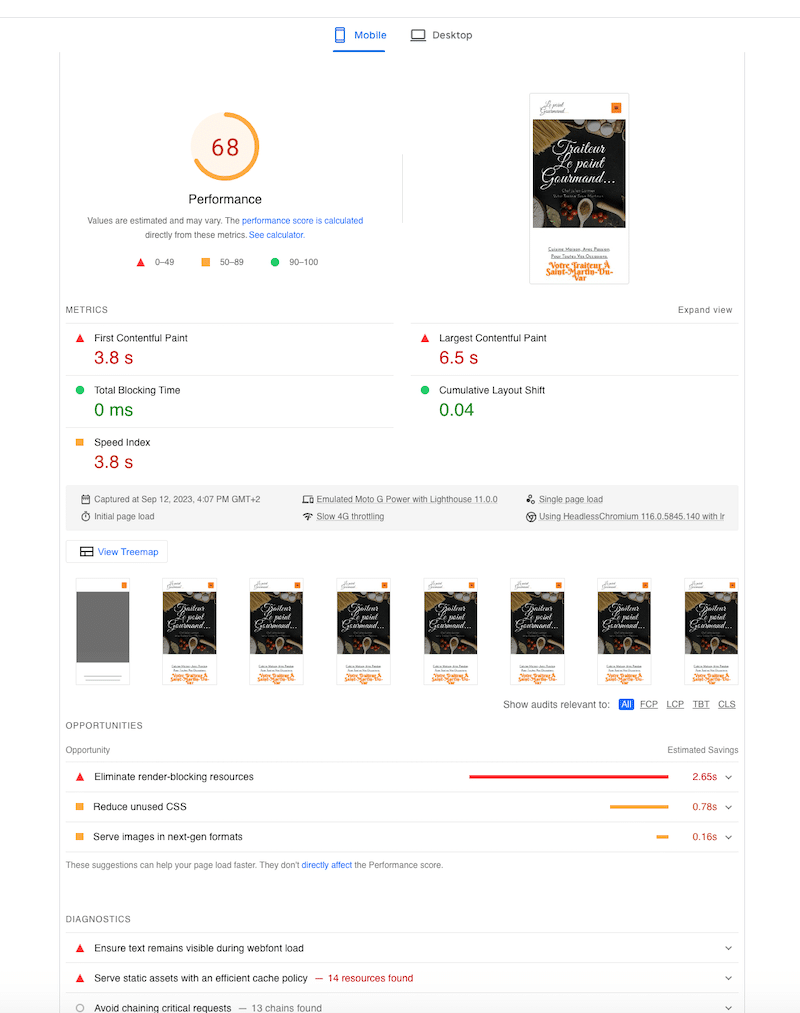
The warning “Serve static assets with an efficient cache policy” is a direct diagnosis of poor browser caching. The “Eliminate render-blocking resources” warning is often caused by unoptimized JavaScript, including tracking scripts from marketing platforms. Implementing the caching strategies from Parts 4 and 5 directly addresses these issues.
By fixing these performance bottlenecks, you:
- Improve User Experience: Fewer visitors leave in frustration.
- Increase Conversion Rate: More visitors complete your desired goals.
- Boost Marketing ROI: The same marketing spend now generates more leads and more revenue because the “bucket” is no longer leaking.
Therefore, investing time and resources into website performance optimization is not a technical expense; it is a high-yield marketing investment. It’s one of the most effective ways to increase the ROI of every other marketing activity you undertake.
Part 7: Your Final Decision-Making Checklist
This guide has covered a vast amount of information, from high-level strategy to low-level server configuration. To bring it all together, here is a practical, step-by-step checklist to guide you through the process of selecting and implementing the best marketing platform for your small business.
The Ultimate Decision-Making Checklist
- Assess Your Needs & Budget.
- What is your primary marketing goal (e.g., lead generation, e-commerce sales, audience building)?
- What are your must-have features versus nice-to-have features? (Refer to the checklist in Part 2).
- What is your realistic monthly budget? Crucially, calculate the potential Total Cost of Ownership (TCO) for your top contenders, considering scaling costs for contacts and users.
- Shortlist Your Platforms.
- Based on the showdown in Part 3, pick your top two contenders.
- Is an all-in-one, user-friendly ecosystem your priority? (Lean towards HubSpot).
- Is powerful, granular automation the most critical factor? (Lean towards ActiveCampaign).
- Is budget the primary constraint, while still needing a full feature set? (Lean towards Brevo).
- Based on the showdown in Part 3, pick your top two contenders.
- Test Drive with Free Trials or Plans.
- Sign up for the free plans (HubSpot, Brevo) or the free trial (ActiveCampaign).
- Spend a few hours in each platform. Is the interface intuitive to you? Can you easily build a simple form and email?
- Install the WordPress plugin on a staging site. How easy is the setup? Does it work as expected?
- Evaluate Your Hosting & Performance.
- Run your live website through Google’s PageSpeed Insights. What is your performance score?
- Look at the “Opportunities” section. Do you see warnings about caching, image optimization, or render-blocking resources?
- Assess your current web host. Are they a budget shared host, or a managed WordPress host with built-in server-level caching? If you plan to scale, is your hosting ready? Consider if an advanced Varnish setup (Part 5) is a future necessity.
- Plan Your Data Migration & Integration.
- How will you move your existing contacts into the new platform? Does the platform offer free migration services? (ActiveCampaign often does).
- List all your other essential tools (e.g., WooCommerce, Stripe, Gravity Forms, Zapier). Check the platform’s integration marketplace to ensure they connect seamlessly.
- Ask the Right Questions During a Demo.
- If you talk to a sales representative, be prepared. Use these questions to get clear answers :
- “Can you walk me through exactly how your pricing scales as my contact list grows from 1,000 to 10,000 to 50,000?”
- “What does your standard onboarding process include, and are there any mandatory fees?”
- “What level of support is included in this plan, and what are the typical response times?”
- “Can you show me an example of how your platform attributes revenue to a specific email campaign?”
- If you talk to a sales representative, be prepared. Use these questions to get clear answers :
Conclusion: Build Your Growth Engine
The journey to finding the “best marketing platform” for your small business is not about discovering a single magic bullet. As we’ve explored, true marketing success in 2025 is the product of a powerful synergy: the right automation software working in concert with a high-performance technical foundation, all measured by a clear focus on ROI.
You’ve seen that platforms like HubSpot offer an unparalleled all-in-one ecosystem, perfect for those committed to the inbound methodology. ActiveCampaign provides a level of automation granularity that can turn a data-savvy marketer into a superhero. And Brevo has leveled the playing field, offering a comprehensive suite of tools that puts powerful marketing within reach of even the most budget-conscious startup.
But the most crucial takeaway is that the platform alone is not enough. Your investment in marketing automation will be fundamentally undermined if your website is slow. By understanding and implementing a robust caching strategy—from simple WordPress plugins to an enterprise-grade Varnish setup—you are not just fixing a technical issue; you are maximizing the ROI of every single marketing dollar you spend. You are ensuring that the traffic you work so hard to acquire is met with a fast, seamless, and conversion-optimized experience.
By following the frameworks and checklists in this guide, you are empowered to move beyond the overwhelming cycle of manual tasks. You are no longer just choosing a tool; you are consciously architecting a scalable, efficient, and profitable growth engine for your business. The path to dominating your market isn’t about outspending your competition—it’s about out-thinking and out-performing them. The time to build your engine is now.
Ready to Stop Spinning and Start Growing?
Take the first, most critical step in your decision-making process. Download our free Platform Comparison & TCO Calculator Spreadsheet to plug in your own numbers, compare features side-by-side, and find the perfect fit for your business.
Frequently Asked Questions (FAQ)
What is the best marketing platform for a small business?
The best marketing platform for a small business depends on its specific needs, budget, and technical expertise. For an all-in-one solution with strong CRM and SEO tools, HubSpot is a top choice. For businesses needing powerful, granular automation at a competitive price, ActiveCampaign excels. For startups and those on a tight budget, Brevo offers a feature-rich free and low-cost plan. The key is to balance features, cost, and ease of use with your business goals.
How much should a small business spend on a marketing platform?
Small businesses typically spend between $50 to $500 per month on marketing automation software, but this varies widely. It’s crucial to consider the Total Cost of Ownership (TCO), which includes the subscription fee, mandatory onboarding costs (which can be thousands of dollars), cost per contact/user, and any necessary add-ons. Start by evaluating free or low-cost ‘Starter’ plans from platforms like Brevo or HubSpot, and scale your investment as your revenue and needs grow.
How does website speed affect marketing success?
Website speed is critical for marketing success. A slow website leads to higher bounce rates, lower conversion rates, and a poor user experience, which wastes money spent on advertising and campaigns. Furthermore, Google uses page speed as a ranking factor, so a faster site can lead to better organic visibility. Implementing caching techniques, like Varnish, directly improves marketing ROI by ensuring visitors from your campaigns have a fast and seamless experience.
What is the difference between CRM and marketing automation?
A CRM (Customer Relationship Management) system is primarily a database for managing relationships and data with individual contacts (leads, customers). It’s your system of record. Marketing automation software uses that data to execute marketing tasks and campaigns at scale, such as sending automated email sequences, segmenting audiences, and scoring leads based on their behavior. Many modern platforms, like HubSpot and ActiveCampaign, combine both functionalities into a single integrated system.
Do I need marketing automation for my small business?
In 2025, yes. With over 75% of businesses using automation, manually managing marketing tasks puts you at a severe competitive disadvantage. Automation saves time, reduces errors, enables personalization at scale, and allows you to nurture leads 24/7. For a small business, it acts as a force multiplier, allowing a small team to achieve the impact of a much larger one.
What is the easiest marketing automation tool for beginners?
For absolute beginners, HubSpot and Brevo are generally considered the easiest to learn. HubSpot has a famously clean and intuitive user interface with excellent onboarding resources. Brevo also features a user-friendly dashboard and straightforward editors. While ActiveCampaign is also well-designed, its depth of features gives it a slightly steeper learning curve compared to the other two.
What is the ROI of marketing automation?
The ROI of marketing automation is typically very high. Studies have shown an average return of $5.44 for every $1 spent . This is achieved through increased efficiency (less manual labor), improved lead nurturing (higher conversion rates), and better customer retention (personalized communication). The ability to accurately track campaigns and attribute revenue makes it easier to prove and optimize this ROI.
[simple-author-box]



 Follow Our RSS Feed
CONNECT WITH US!!