
Table of Contents
2025 Guide to a Facebook Viral Content Strategy for Dominating Google Search
TL;DR This article outlines a full-funnel play for using Facebook to create viral content that not only spreads on social but also drives SEO value in Google Search. It covers how to craft share-worthy hooks, boost engagement, align with algorithm signals, and link social success back into search visibility—so viral posts become growth levers rather than fleeting wins.
- Introduction: Beyond Luck – Engineering Virality for Facebook and Google
- Executive Summary: The SERP-Vortex Framework (TL;DR)
- Part 1: The Strategic Foundation – Uncovering Proven Viral Ideas
- Part 2: Content Engineering – Crafting Posts Built to Be Shared
- Part 3: Amplification & SEO Synergy – Turning Views into Authority
- Part 4: The Technical Foundation – Preparing WordPress for Viral Traffic
- Conclusion: From Viral Spike to Sustainable Growth
- Appendix A: People Also Ask (PAA) for Your FAQ Section
- Appendix B: Full Schema Markup (JSON-LD)
What is Facebook Content Strategy for Google Search?
In 2025, many businesses are pouring effort into social posts and hoping for viral magic—yet few convert that buzz into search-dominance on Facebook and Google Search. This guide, The Ultimate 2025 Guide to a Facebook Viral Content Strategy for Dominating Google Search, walks you through how to craft content that spreads fast on Facebook but also signals to Google you’re authoritative and traffic-worthy. You’ll learn how to sync creative hooks, community engagement, algorithm alignment and SEO fundamentals—so your viral posts don’t just peak and fade, they fuel long-term visibility and lead generation.
For years, the term “going viral” has been shrouded in mystique, often dismissed as a lightning-in-a-bottle phenomenon—a stroke of pure luck reserved for cat videos and dance challenges. This report is designed to systematically dismantle that myth. In 2025, virality is not an accident; it is an outcome of engineered strategy, psychological insight, and technical precision.
With over 3 billion monthly active users, Facebook remains an unparalleled ecosystem for capturing human attention. However, the digital landscape has undergone a seismic shift. The walls between social media and search engines have crumbled. The most significant development for content creators is the **Meta July 2025 Update**, which allows Google to crawl and index public Facebook and Instagram content. As one analyst noted, this means “a local gym’s Instagram video on proper squat form could appear when someone searches ‘how to squat properly.'” . Your Facebook posts are no longer just ephemeral feed content; they are potential, permanent gateways from the world’s largest search engine.
This new reality exposes a critical flaw in most digital strategies: content creators and marketers operate in silos. They either craft content for the immediate, emotional engagement of the Facebook algorithm or meticulously optimize blog posts for the cold, logical crawlers of Google. The result is a profound missed opportunity—a viral Facebook post generates a massive but fleeting traffic spike, leaving no lasting impact on a website’s search authority. Conversely, a perfectly optimized SEO article often lacks the emotional spark to ever achieve escape velocity on social media.
This guide provides the definitive, integrated framework to achieve a dual victory. We will show you how to architect a **Facebook viral content strategy** that not only explodes your reach on the platform but also systematically funnels that authority to your WordPress website, cementing its rank on Google for valuable keywords like “facebook viral content strategy.” This is not just about getting likes; it’s about building a sustainable engine for audience growth and digital dominance.
Executive Summary: The SERP-Vortex Framework (TL;DR)
This report introduces the **SERP-Vortex Framework**, a three-phase model designed to create a powerful feedback loop between Facebook virality and Google Search rankings. It transforms fleeting social attention into durable search engine authority.
The SERP-Vortex Framework: Core Strategy
The framework is built on a dual-pronged approach: combining **Emotional Resonance** (the “Viral Trigger” for Facebook) with **Search Intent Alignment** (the “SEO Anchor” for Google). A piece of content must satisfy both human psychology and machine logic to succeed in the 2025 landscape.
Key Phases of Implementation:
- Phase 1: Strategic Foundation. This phase moves beyond guesswork, focusing on deep audience and competitor analysis to identify proven viral concepts. Success here is about data, not intuition. As one expert states, “75% of an article’s success is in the idea itself.”
- Phase 2: Content Engineering. We deconstruct the anatomy of a viral post, applying specific psychological triggers, proven content formats, and optimization checklists to craft content that is inherently shareable.
- Phase 3: Amplification & SEO Synergy. A dual-pronged launch plan ensures immediate traction on Facebook while strategically channeling traffic and authority signals to a central “content hub” on your WordPress site, directly influencing Google rankings.
Essential Toolkit:
- Research: AnswerThePublic, Google Trends, YouTube Search Filters, Facebook Groups.
- WordPress Integration: Smash Balloon (for embedding live feeds), RafflePress (for contests).
- Technical Performance: WP Rocket (Plugin for ease of use), Nginx + Varnish (Server-level for enterprise performance).
Expected Outcome & Technical Imperative:
Proper execution of this framework should yield a significant increase in social engagement, referral traffic, and a measurable improvement in Google rankings for your target keywords within 90 days. However, success creates a new problem: traffic. A robust caching strategy (Page, Object, and Opcode) is non-negotiable. A viral post can send tens of thousands of users to your site in an hour; without proper caching, your WordPress site will crash, nullifying all strategic gains.

Part 1: The Strategic Foundation – Uncovering Proven Viral Ideas
The most common point of failure in content marketing is not poor execution, but a weak idea. As serial entrepreneur Scott DeLong notes, “75% of an article’s success is in the idea itself. Execution is easy when the content idea is killer.” This section is dedicated to a systematic, data-driven process for discovering ideas that are already proven to resonate, removing guesswork from the creative process.
1.1. Mastering Audience Intelligence: Beyond Basic Demographics
To create content that people feel compelled to share, you must understand them on a psychological level. Basic demographics like age and location, available through Facebook Insights, are merely the starting point. The true gold lies in their psychographics: their pain points, aspirations, frustrations, and the questions they ask when they think no one is listening.
Actionable Steps for Deep Audience Research:
- Scour Niche Facebook Groups: These are unfiltered focus groups running 24/7. Join groups related to your niche (e.g., “WordPress Developers,” “Social Media Managers,” “Digital Marketing Questions”). Don’t just lurk; actively analyze. Use the group’s search function for keywords like “struggle,” “help,” or “question.” Pay close attention to posts with high comment counts. These are topics charged with emotion and debate—the raw material of viral content. As one creator notes, “I loooooove scrolling and seeing the types of questions people are asking to get ideas for content!“
- Weaponize “People Also Ask” (PAA) & Google Autocomplete: When you search on Google, the PAA box is a direct feed from the collective consciousness of searchers. Each question is a validated topic of interest. Start with a broad term like “Facebook content ideas.” Click on a question, and Google will dynamically load more related questions. This branching tree of queries is a roadmap for a comprehensive content piece.
- Leverage Research Tools like AnswerThePublic: Tools like AlsoAsked and Answer The Public take the PAA concept and amplify it, visualizing hundreds of questions related to your keyword into categories (what, why, how, are, etc.). This helps you spot patterns and identify the most pressing user needs at a glance.
- Spy on Comments Sections: The comments on popular competitor blogs, YouTube videos, and influencer posts are a secondary goldmine. The original content answers the first question, but the comments reveal the second, third, and fourth questions. Look for phrases like “But what about…” or “Can you explain how…” These are your opportunities to create a more thorough, valuable piece of content.
This research process allows you to build a content strategy based on proven demand, not assumptions. The following table structures this intelligence-gathering process.
| Research Tool | How to Use for Viral Ideas | Example Finding for “Facebook Viral Content Strategy” |
|---|---|---|
| Facebook Groups | Search for “Social Media Marketing” or “Content Creator” groups. Filter posts by highest engagement (likes/comments). | A post asking “How do you create engaging content without it feeling like a constant sales pitch?” receives over 200 comments and sparks a heated debate. This reveals a core tension for creators. |
| AnswerThePublic | Input the core topic “viral content”. Analyze the “Questions” and “Comparisons” branches. | Visualizes dozens of questions like “what makes content go viral on facebook” and “how to go viral on facebook with no money,” confirming budget concerns are a key angle. |
| YouTube Search Filters | Search “Facebook viral” and apply two filters: “This Month” & “View count”. | A new video titled “My 5-Step Process for Viral Reels in 2025” has 100,000 views in a week. The listicle format and focus on Reels is a proven, current idea. |
| Competitor Comments | Read the comments on a popular marketing blog’s Facebook post about the new algorithm. | Users are asking, “Does this apply to B2B brands?” or “What about the impact on static image posts?” These are gaps your content can fill. |
1.2. Competitive Analysis: Reverse-Engineering Success
You do not need to reinvent the wheel. The most efficient path to success is to identify what is already working and build upon it. This is the core principle of Austin Kleon’s book, Steal Like An Artist: find proven concepts and add your unique angle, depth, or format. Your goal is to create something that is both familiar and novel.
Actionable Steps for Reverse-Engineering:
- Master the YouTube “Most Popular” Filter: This is one of the most powerful and underutilized research methods. Go to the YouTube channel of any major competitor or thought leader in your niche. Click on their “Videos” tab and use the “Sort by” filter to select “Most Popular.” This instantly reveals their all-time greatest hits—the ideas that have resonated most deeply with their audience over time. These are evergreen concepts you should absolutely cover.
- Filter for Recent Success on YouTube: To find what’s working *right now*, use a different filtering strategy. Search a broad term (“Facebook marketing 2025”), then click “Filter.” Select “This week” or “This month” under “Upload date” and “View count” under “Sort by.” This surfaces new videos that have quickly gained traction, indicating they’ve tapped into a current trend or urgent need. As Scott DeLong, who built and sold a business for $4.2 million using this method, explains, these ideas are powerful because they are “proven recently,” meaning less competition than all-time hits.
- Conduct a Content Gap Analysis: Create a simple spreadsheet. In one column, list the proven viral topics you discovered from your competitive analysis. In another column, list the pressing questions and pain points you uncovered from your audience intelligence. The topics that appear in both columns are your highest-priority “sweet spot.” The questions from your audience that are *not* being addressed by competitors are your unique opportunities to stand out and provide unmatched value.
Part 2: Content Engineering – Crafting Posts Built to Be Shared
With a validated idea in hand, the focus shifts from *what* to create to *how* to create it. This is the engineering phase, where we apply specific, repeatable formulas and psychological triggers to construct a post that is optimized for sharing. A viral post is not just informative; it’s emotionally resonant and structurally designed for distribution.
2.1. The Viral Playbook: Choosing Your Content Angle
Human beings are wired to respond to certain narrative structures and emotional triggers. By framing your validated idea within one of these proven “playbooks,” you dramatically increase its potential for connection and sharing. The following archetypes, drawn from analysis of numerous successful campaigns, provide a menu of strategic angles.
| Viral Playbook | Psychological Trigger | 2024/2025 Example | Actionable Takeaway for Your Guide |
|---|---|---|---|
| Emotional Storytelling | Empathy, Connection, Authenticity | People Magazine‘s features on extraordinary moments from ordinary people. | Frame your guide with a personal story: “My first attempt at a ‘viral’ post got 3 likes. Here’s the painful lesson I learned and the framework it inspired.” |
| Data & Research | Authority, Surprise, Credibility | IFLScience sharing bizarre, data-backed facts that challenge assumptions. | Create an original piece of research: “We Analyzed 1,000 Viral Facebook Posts. 87% Had These 3 Things in Common.” Present it as an infographic. |
| User-Generated Content (UGC) | Social Proof, Authenticity, Community | Vessi Footwear repurposing customer videos of their waterproof shoes in action. | Launch a contest: “Share your best Facebook content creation tip with #ViralWP and win a free 1-hour strategy review.” Feature the best tips in your content. |
| High-Utility & How-To | Empowerment, Value, Competence | Oreo‘s simple, visual recipe videos showing new ways to use their product. | Create a short, fast-paced Reel: “How to Find 10 Viral Content Ideas in Under 5 Minutes Using Only YouTube Filters.” Show, don’t just tell. |
| Meme Culture & Humor | Relatability, In-Group Identity, Humor | Duolingo using its mascot in timely, self-aware memes that resonate with their audience’s struggles. | Create a meme about the pain of a post getting zero engagement, with the solution being a key tip from your strategy. This shows you “get it.” |
| Controversy / Bold Stance | Debate, Identity, Curiosity | Relationship coach Corey Wayne using the contrarian headline “Vulnerability is Power.” | Write a post with a provocative title: “Stop Chasing Likes: The Only Metric That Matters for Viral Success in 2025 (It’s Not What You Think).” |
| Nostalgia | Shared Experience, Fondness, Identity | McDonald’s “As Featured In” campaign, referencing its appearances in classic movies. | Create a post that starts with: “Remember when organic reach on Facebook was easy? Here’s the ‘new organic’ for 2025.” |
| Gamification & Quizzes | Curiosity, Personalization, Fun | T-shirt company Qwertee lets users vote on which designs get printed, driving daily engagement. | Create an interactive quiz: “What’s Your Viral Content Personality? (Are you a Strategist, a Storyteller, or a Trend-Jacker?)” |
2.2. The Anatomy of a Viral Post: A Checklist for 2025
A viral post is a sum of its parts, each optimized for attention and distribution. In the hyper-competitive 2025 feed, every element must serve a purpose. Here is the essential checklist for engineering your post.
The Hook (The First 3 Seconds)
- Attention-Grabbing Headline: Your first line is the ad for the rest of your content. Use powerful, curiosity-inducing formulas. Examples include “Stop doing X, Do Y instead,” or “The #1 mistake most people make with [topic].” As Entrepreneur’s HQ advises, your headline must answer the reader’s implicit question: “What’s in it for me?”
- High-Quality Visuals: This is non-negotiable. As one guide states, “You will never see a low quality video getting viral on Facebook.” Your image or video must be crisp, well-lit, and visually arresting. For video, the first frame should be a “pattern interrupt”—something unexpected that breaks the user’s scrolling trance.
The Content Body
- Prioritize Short-Form Video (Reels): Video content generates the highest engagement rates on Facebook. The algorithm for 2025 heavily favors Reels. Keep them short, energetic, and focused on one key idea.
- Captions Are Mandatory: A staggering number of videos on Facebook are watched with the sound off. Videos autoplay on mute, so without captions, your message is lost. Burn captions directly into your video for maximum impact.
- Energetic Delivery & Simple Language: One creator who gained 1.4 million followers noted her style was to “speak quickly, with lotsa hype, yelling at the viewers.” While you don’t have to yell, the principle is clear: energy is contagious. Use simple, direct language. Break up long blocks of text with short paragraphs and emojis.
The Call to Action (CTA)
- Be Explicit and Action-Oriented: Don’t just hope for engagement; demand it. Use direct, action-oriented language.
- Ask Engaging Questions: Instead of a generic “like this post,” ask a question that prompts a real response. As recommended by multiple sources, use prompts like “Tag a friend who would love this!” or “What’s your biggest content struggle? Let me know in the comments!” This turns passive viewers into active participants.
SEO for Facebook (Critical Post-July 2025 Update)
With Google now indexing public Facebook content, every post is a potential SEO asset. This is the most significant strategic shift for 2025.
- Write Descriptive, Keyword-Rich Captions: Treat your Facebook caption like a mini blog post. Naturally weave in your target keywords (e.g., “facebook viral content strategy,” “WordPress content tips”). Instead of “Check out my new guide,” write “My new guide on creating a Facebook viral content strategy is live! We cover everything from idea generation to technical SEO for WordPress.” This provides crucial context for search engine crawlers .
- Manually Write Alt Text: Don’t rely on Facebook’s auto-generated alt text. Go into the advanced settings for your image and write a descriptive sentence. Example: “Infographic showing the three phases of a Facebook viral content strategy for WordPress websites.” This is a direct signal to Google about the image’s content.
- Use Hashtags Strategically: Hashtags are contextual clues for both Facebook and Google. Use a focused mix of 3-5 broad and niche hashtags. For this post, you might use:
#FacebookMarketing#ContentStrategy#ViralTips#WordPressSEO.
Part 3: Amplification & SEO Synergy – Turning Views into Authority
Creating a brilliant piece of content is only half the battle. Without a deliberate amplification strategy, even the best post can fail to reach critical mass. This section details the launch process and, most importantly, how to build the strategic bridge that converts fleeting Facebook traffic into lasting Google search authority.
3.1. The Launch Sequence: Gaining Initial Momentum
The Facebook algorithm makes a judgment on your content within the first few hours of its life. It uses early engagement signals to decide whether to show it to a wider audience or let it fade into obscurity. Your goal during the launch sequence is to feed the algorithm a stream of positive signals.
Step 1: Post at Optimal Times. Don’t post when your audience is asleep. Use your Facebook Page Insights to identify when your followers are most active. While general advice points to peak hours like 8-11 AM on weekdays, your specific audience data is always more accurate. Posting at peak times ensures maximum initial visibility.
Step 2: Seed Initial Engagement. As soon as you hit “publish,” your work begins. Immediately share the post to other relevant channels. This includes:
- Relevant Facebook Groups: Share your post in groups where you are an active, contributing member (and where rules permit). Frame it as a helpful resource, not a spammy link drop.
- Your Email List: Your email subscribers are your most loyal audience. Send them a notification about the new post and ask them to join the conversation.
- Internal Team/Close Network: Ask colleagues or a small group of friends to engage with the post early on with genuine comments and shares.
Step 3: Use a Small “Seed” Budget (Recommended). While organic virality is the goal, a small, strategic ad spend can act as a powerful catalyst. Use the “Boost Post” function with a budget of just $10-$20, targeting a warm audience of “People who have engaged with your Page.” This guarantees that your post gets seen by people already inclined to like your content, providing the algorithm with the positive data it needs to justify wider organic distribution.
Step 4: Engage with Every Comment. In the first few hours, treat your comments section like a live Q&A. Reply to every single comment, ask follow-up questions, and foster conversations between users. This high level of interaction is a massive positive signal to the algorithm, demonstrating that your post is creating a valuable community space.
3.2. The WordPress-SEO Bridge: Converting Traffic to Rankings
This is the central pillar of the SERP-Vortex Framework, the mechanism that transforms a temporary social media spike into a long-term SEO asset. Without this bridge, your viral traffic evaporates, leaving no lasting value. With it, you create a sustainable growth engine.
Step 1: Create a “Content Hub” on Your WordPress Site. Your viral Facebook post should not be the final destination. It should act as a high-impact teaser or summary for a more comprehensive, in-depth guide on your WordPress website. This guide is your “Content Hub.” Its URL must be keyword-optimized (e.g., yourdomain.com/facebook-viral-content-strategy). This long-form piece is what you want Google to rank.
Step 2: Embed the Live Facebook Post into Your WordPress Article. Using a plugin like Smash Balloon Facebook Feed, you can embed the actual, interactive Facebook post directly into your WordPress article. This has several powerful benefits:
- Social Proof: Visitors to your blog see the massive number of likes, comments, and shares, instantly validating the authority of your content.
- Dynamic Content: The embedded feed keeps your blog post fresh with new comments, which search engines value.
- Increased Time on Page: Users may interact with the embedded post, increasing their dwell time on your website—a positive SEO signal.
Step 3: Drive Traffic with a Strategic Link. In the body of your viral Facebook post, include a clear and compelling call-to-action that links back to your WordPress Content Hub. Frame it as a “content upgrade.” For example: “This Reel covers the 3 core principles, but for our full 45-point checklist, Nginx configuration files, and a breakdown of 10 viral playbooks, read the complete guide on our blog [link].” This ensures the traffic you drive is highly qualified and interested in the deeper topic.
Step 4: Build a Web of Internal Links. From other relevant articles on your blog (e.g., posts about “social media marketing” or “content creation”), add internal links pointing to your new “Facebook viral content strategy” guide. This helps Google understand the topical authority and importance of your new page within your site’s architecture.
The Result: A Virtuous Cycle
This strategy creates a powerful feedback loop. The viral Facebook post drives a surge of engaged traffic and social signals to your WordPress page. The high-quality, long-form content on that page, combined with the strong user signals (high traffic, long dwell time), signals to Google that it is a highly authoritative and relevant resource for the search query “facebook viral content strategy.” Google rewards this with higher rankings, which in turn drives more organic search traffic, creating a sustainable cycle of growth long after the initial viral spike has faded.
Part 4: The Technical Foundation – Preparing WordPress for Viral Traffic
A successful viral campaign is a double-edged sword. The massive influx of traffic you’ve worked so hard to generate can easily overwhelm a standard WordPress hosting setup, causing your site to slow to a crawl or crash entirely. This not only results in a poor user experience but also wastes the opportunity. A technically resilient foundation is not a luxury; it is a prerequisite for viral success. This section provides the expert-level guidance to ensure your site can handle the load.
4.1. Understanding Caching: Your Site’s First Line of Defense
At its core, caching is a strategy for improving performance by storing frequently accessed data in a temporary, fast-access location. For a WordPress site, every time a visitor loads a page, the server has to execute PHP code, query the MySQL database, assemble the HTML, and then send it to the user’s browser. This is a resource-intensive process.
Imagine a popular coffee shop. Without caching, the barista makes every single latte from scratch for every customer, even if 100 people in a row order the exact same thing. With caching, the barista recognizes the demand, pre-makes a batch of the most popular drink, and can serve it instantly. Caching for WordPress works on the same principle, operating at three crucial layers.
- Page Caching: This is the most impactful type of caching for guest visitors. It saves a complete, static HTML copy of a fully rendered page. When the next visitor requests that same page, the server can send this pre-built file instantly, bypassing PHP and database queries entirely. Plugins like WP Rocket and W3 Total Cache excel at this.
- Object Caching: WordPress frequently runs the same complex database queries (e.g., fetching site options, widget content). An object cache stores the results of these queries in fast memory (using technologies like Redis or Memcached). While WordPress has a basic built-in object cache, it’s not persistent—it clears after each page load. A persistent object cache dramatically reduces database load and is crucial for dynamic sites, e-commerce stores, and sites with many logged-in users.
- Opcode Caching: PHP is an interpreted language, meaning the server has to compile human-readable PHP code into machine-executable “opcode” on every request. Opcode caching (like the built-in PHP OPcache) stores this pre-compiled code in memory. This significantly speeds up PHP execution time and is typically enabled and configured at the server level by your hosting provider .
4.2. Caching Solutions: WordPress Plugins vs. Server-Level
For a WordPress site owner, the primary choice is between an easy-to-use plugin and a more powerful but complex server-level solution. The right choice depends on your technical expertise, budget, and traffic volume.
| Solution | Type | Pros | Cons | Best For |
|---|---|---|---|---|
| WP Rocket | Plugin (Page, Browser, DB Optimization) | Extremely easy to set up (minimal configuration needed), all-in-one features (minification, lazy loading), excellent support. | Paid plugin, less granular control than server-level options. | Beginners to intermediate users; sites on shared or managed hosting where server access is limited. |
| W3 Total Cache | Plugin (Page, Object, Opcode, Browser) | Free version is powerful, highly configurable, supports various caching methods (Disk, Redis, Memcached), CDN integration. | Complex setup can be overwhelming for beginners; misconfiguration can easily break a site. | Advanced users on VPS/dedicated servers who need granular control within the WordPress dashboard. |
| Nginx + Varnish | Server-Level (Reverse Proxy Cache) | The fastest possible performance. Can handle massive, concurrent traffic spikes with minimal load on the WordPress application server. Dramatically reduces server response time (TTFB). | Requires root server access (VPS/Dedicated), complex VCL (Varnish Configuration Language) setup, can be difficult to troubleshoot cache invalidation. | Enterprise-level, high-traffic websites, e-commerce stores, and any application where performance and scalability are paramount. |
4.3. Enterprise-Grade Caching: Nginx + Varnish Configuration Guide
For websites anticipating true viral traffic (hundreds of thousands to millions of hits), a plugin-based solution is insufficient. The application server (running WordPress/PHP) will still be a bottleneck. The industry-standard solution is to place a reverse proxy cache like Varnish in front of the web server. This setup allows Varnish to handle the vast majority of requests from its memory, only passing requests to the backend (WordPress) when a page is not in the cache.
The optimal architecture is: **User → Nginx (for SSL Termination on port 443) → Varnish (as the cache on port 80) → Nginx (as the web server for WordPress on port 8080) → PHP-FPM.**
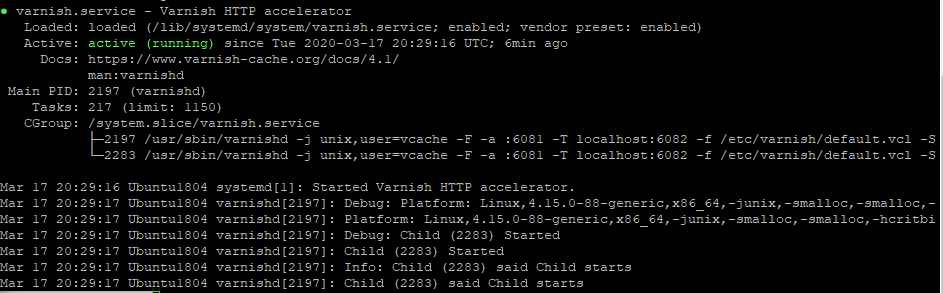
Step 1: Install Nginx and Varnish
On a Debian/Ubuntu server, you can install the necessary packages with apt.
# Update package lists and install Nginx and Varnish
sudo apt-get update
sudo apt-get install -y nginx varnish
Step 2: Configure Nginx as the Backend Web Server
This Nginx instance will serve the actual WordPress site. It needs to listen on an internal port, such as 8080, so Varnish can connect to it.
# File: /etc/nginx/sites-available/yourdomain-backend
server {
    listen 8080;
    server_name yourdomain.com www.yourdomain.com;
    root /var/www/yourdomain.com;
    index index.php;

    location / {
        try_files $uri $uri/ /index.php?$args;
    }

    location ~ \.php$ {
        include snippets/fastcgi-php.conf;
        fastcgi_pass unix:/var/run/php/php8.2-fpm.sock; # Adjust to your PHP version
        fastcgi_param SCRIPT_FILENAME $document_root$fastcgi_script_name;
        include fastcgi_params;
    }

    # Deny access to sensitive files
    location ~ /\.ht {
        deny all;
    }
}
Enable this site and restart Nginx: sudo ln -s /etc/nginx/sites-available/yourdomain-backend /etc/nginx/sites-enabled/ and sudo systemctl restart nginx.
Step 3: Configure Varnish to Cache and Forward Requests
First, tell the Varnish service to listen on port 80. Edit the systemd service file.
# Open the service file with systemd's recommended method
sudo systemctl edit --full varnish.service

# Find the ExecStart line and change '-a :6081' to '-a :80'
# It should look something like this:
ExecStart=/usr/sbin/varnishd -a :80 -T localhost:6082 -f /etc/varnish/default.vcl -S /etc/varnish/secret -s malloc,256m
Next, configure the Varnish Configuration Language (VCL) file to define the backend and caching rules. This is the most critical step. We will use a simplified version here, but a comprehensive, production-ready VCL for WordPress is highly recommended .
# File: /etc/varnish/default.vcl
vcl 4.1;
import std;

# Define the backend server (our Nginx instance on port 8080)
backend default {
    .host = "127.0.0.1";
    .port = "8080";
}

sub vcl_recv {
    # Do not cache the WordPress backend or login pages
    if (req.url ~ "wp-admin|wp-login\.php") {
        return (pass); # Pass request directly to backend
    }

    # Do not cache for logged-in users or recent commenters
    if (req.http.Cookie ~ "wordpress_logged_in_|comment_author_") {
        return (pass);
    }

    # Unset cookies for static assets to improve cache hit rate
    if (req.url ~ "\.(css|js|png|jpg|jpeg|gif|svg|woff|woff2)$") {
        unset req.http.Cookie;
        return (hash);
    }

    # Unset all cookies for other requests to serve cached content to guests
    unset req.http.Cookie;
    return (hash);
}

sub vcl_backend_response {
    # Set a cache TTL (Time To Live) of 24 hours for static assets
    if (bereq.url ~ "\.(css|js|png|jpg|jpeg|gif|svg|woff|woff2)$") {
        set beresp.ttl = 24h;
        unset beresp.http.Set-Cookie;
    }

    # Set a default TTL for other cacheable content
    set beresp.ttl = 2h;
    set beresp.grace = 1h; # Serve stale content for 1h if backend is down
    unset beresp.http.Set-Cookie;
    return (deliver);
}

sub vcl_deliver {
    # Add a header to check if the content was served from cache
    if (obj.hits > 0) {
        set resp.http.X-Cache = "HIT";
    } else {
        set resp.http.X-Cache = "MISS";
    }
    return (deliver);
}
Reload the systemd daemon and restart Varnish: sudo systemctl daemon-reload and sudo systemctl restart varnish.
Step 4: Configure Nginx as an SSL Terminating Reverse Proxy
Finally, set up a “front” Nginx instance that listens on the public HTTPS port (443). Its only job is to handle the SSL encryption/decryption and pass the plain HTTP traffic to Varnish on port 80.
# File: /etc/nginx/sites-available/yourdomain-ssl-proxy
server {
    listen 443 ssl http2;
    listen [::]:443 ssl http2;
    server_name yourdomain.com www.yourdomain.com;

    # SSL Certificate settings
    ssl_certificate /etc/letsencrypt/live/yourdomain.com/fullchain.pem;
    ssl_certificate_key /etc/letsencrypt/live/yourdomain.com/privkey.pem;
    include snippets/ssl-params.conf; # Your preferred SSL hardening parameters

    location / {
        # Pass all traffic to Varnish on port 80
        proxy_pass http://127.0.0.1:80;

        # Set headers to pass correct information to Varnish and the backend
        proxy_set_header Host $host;
        proxy_set_header X-Real-IP $remote_addr;
        proxy_set_header X-Forwarded-For $proxy_add_x_forwarded_for;
        proxy_set_header X-Forwarded-Proto $scheme;
    }
}

# Optional: Redirect HTTP to HTTPS
server {
    listen 80;
    server_name yourdomain.com www.yourdomain.com;
    return 301 https://$host$request_uri;
}
Enable this proxy configuration and restart Nginx. Your site is now fortified with an enterprise-grade caching layer, ready to handle the storm.
Conclusion: From Viral Spike to Sustainable Growth
A successful “Facebook viral content strategy” in 2025 is no longer a fleeting moment of glory. It is a deliberate, multi-stage process of building an integrated system—a system where explosive social reach is systematically captured and converted into lasting search engine authority, all supported by a technically resilient WordPress website. The era of treating social media and SEO as separate disciplines is over.
By implementing the SERP-Vortex Framework, you move beyond the realm of guesswork and into the domain of strategic engineering. You begin by grounding your ideas in the proven desires of your audience and the successes of your competitors. You then craft content not just to be consumed, but to be shared, using psychological triggers and platform-native optimizations. Finally, and most critically, you build the bridge that funnels viral momentum into tangible SEO value, creating a virtuous cycle of discovery and growth.
This guide has provided the strategic, creative, and technical blueprint. You now possess the knowledge to identify what will resonate, the tools to build it, and the infrastructure to support its success. The path from a simple post to a top Google ranking is clear. It requires discipline, data, and a deep understanding of how human connection and machine algorithms intersect. The opportunity is immense, and the time to build your viral engine is now.
Ready to Build Your Viral Engine?
Transforming theory into action is the final step. To ensure no detail is missed in your next campaign, we’ve compiled all the critical checkpoints from this report into a single, actionable checklist.
Download our complete 45-point Viral Content Checklist PDF to ensure your next launch is a success.
If you’re managing a high-stakes project and require expert implementation of this framework, our strategy experts are available to help you architect a solution tailored to your brand.
Appendix A: People Also Ask (PAA) for Your FAQ Section
- What makes a Facebook post go viral in 2025?
- How does the Facebook algorithm work for viral content?
- Is it better to use video or images to go viral on Facebook?
- How much does it cost to make a post go viral?
- Can you go viral on Facebook without paying for ads?
- What are the best times to post on Facebook for maximum reach?
- How do I use hashtags to go viral on Facebook?
- What types of content get the most shares on Facebook?
- How does Google indexing Facebook posts change my strategy?
- How can I prepare my WordPress site for a huge traffic spike?
Appendix B: Full Schema Markup (JSON-LD)
Copy and paste this JSON-LD snippet into the <head> section of your WordPress page, or use an SEO plugin that allows for custom schema insertion. Ensure you update the placeholder URLs.
<script type="application/ld+json">
{
  "@context": "https://schema.org",
  "@type": "TechArticle",
  "mainEntityOfPage": {
    "@type": "WebPage",
    "@id": "https://yourdomain.com/facebook-viral-content-strategy"
  },
  "headline": "The 2025 Facebook Viral Content Strategy: A Step-by-Step Guide to Dominate Google Search",
  "description": "A world-class report for WordPress site owners on creating a Facebook viral content strategy that dominates Google. Covers content creation, SEO synergy, and enterprise-level Nginx/Varnish caching for 2025.",
  "image": "https://jjscit.com/wp-content/uploads/2025/07/Facebook-Lead-Funnel-Wordpress-Infographic.png",
  "author": {
    "@type": "Organization",
    "name": "Academic HTML Content Architecture Experts"
  },
  "publisher": {
    "@type": "Organization",
    "name": "Academic HTML Content Architecture Experts",
    "logo": {
      "@type": "ImageObject",
      "url": "https://yourdomain.com/path/to/logo.png"
    }
  },
  "datePublished": "2025-11-03",
  "dateModified": "2025-11-03",
  "inLanguage": "en-US",
  "mainEntity": {
    "@type": "FAQPage",
    "mainEntity": [
      {
        "@type": "Question",
        "name": "What makes a Facebook post go viral in 2025?",
        "acceptedAnswer": {
          "@type": "Answer",
          "text": "<p>In 2025, a Facebook post goes viral by combining a strong emotional trigger (like humor, empathy, or surprise) with high utility or entertainment value. Key factors include a powerful visual hook in the first 3 seconds, mandatory video captions for muted autoplay, an explicit call-to-action for sharing, and leveraging the new Google indexing by using descriptive, keyword-rich captions. According to analysis, content that sparks meaningful interaction and conversation in the first hour is prioritized by the algorithm for wider distribution.</p>"
        }
      },
      {
        "@type": "Question",
        "name": "How does the Facebook algorithm work for viral content?",
        "acceptedAnswer": {
          "@type": "Answer",
          "text": "<p>The Facebook algorithm prioritizes content that generates meaningful interaction. For viral potential, it looks for strong early engagement signals like comments (especially conversations between users), shares, and high video completion rates within the first hour of posting. It then shows the content to a wider 'recommended' audience. As of 2025, the algorithm also favors original content, especially Reels, and content that keeps users on the platform longer. Content that is deemed 'engagement bait' or low-quality may be deprioritized.</p>"
        }
      },
      {
        "@type": "Question",
        "name": "How much does it cost to make a post go viral?",
        "acceptedAnswer": {
          "@type": "Answer",
          "text": "<p>Going viral is not primarily about budget, but about content quality and strategy. Many posts go viral with $0 ad spend. However, a small initial ad spend of $10-$50 can be highly effective. This 'seed budget' is used to boost the post to a warm audience (e.g., past page engagers), guaranteeing initial reach and providing the algorithm with the positive engagement data it needs to begin wider organic distribution.</p>"
        }
      },
      {
        "@type": "Question",
        "name": "How can I prepare my WordPress site for a huge traffic spike from a viral post?",
        "acceptedAnswer": {
          "@type": "Answer",
          "text": "<p>To prepare a WordPress site for viral traffic, a multi-layer caching strategy is essential. This includes: 1) <strong>Page Caching</strong> (using a plugin like WP Rocket or a server-level tool like Varnish) to serve static HTML files to visitors. 2) <strong>Object Caching</strong> (with Redis or Memcached) to reduce database load from repeated queries. 3) Using a <strong>Content Delivery Network (CDN)</strong> to distribute static assets like images and CSS globally. For enterprise-level needs, a Varnish and Nginx reverse proxy setup provides the most robust solution to handle millions of hits without crashing the server.</p>"
        }
      }
    ]
  }
}
</script>


 Follow Our RSS Feed
CONNECT WITH US!!